
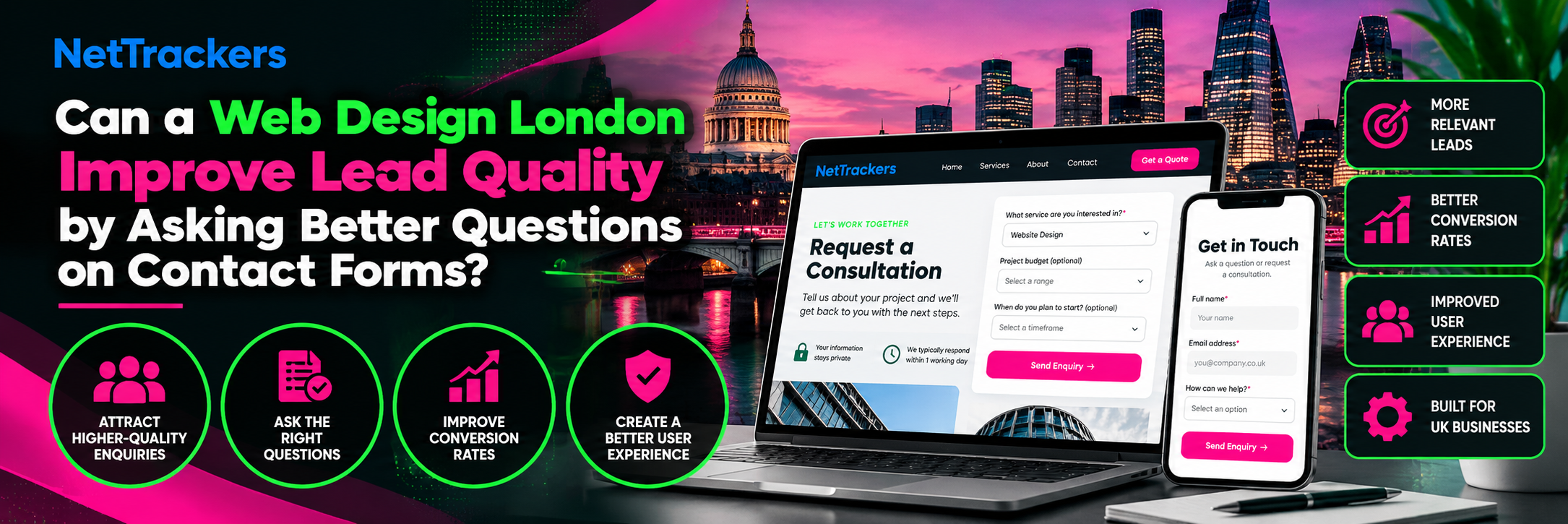

A contact form should do more than collect names and email addresses. It should help a business understand what a potential customer needs and whether the enquiry matches its services. A thoughtful web design London strategy can improve this process by asking relevant questions without creating unnecessary obstacles. However, adding more fields does not automatically produce better leads, and excessive questions may discourage suitable customers. The objective is to balance form completion, customer experience and useful qualification information.
For UK service businesses, contact forms often provide the first structured interaction with a potential customer. Someone requesting a website quotation may have different requirements from a visitor seeking ongoing marketing support. If both receive the same generic form, the business may struggle to understand their priorities before responding. Conversely, a form that demands extensive information can create friction before trust has developed. Effective website design should help visitors communicate their needs while giving sales teams enough context to respond appropriately.
Why Do Some Contact Forms Generate Poor-Quality Leads?
Poor-quality enquiries can arise when a website attracts visitors who are not looking for the services offered. They can also result from unclear service descriptions, misleading calls to action or forms that collect insufficient information. A short form may generate numerous submissions without revealing whether a prospect has a relevant project. However, the form itself may not be responsible for every unsuitable enquiry. Businesses should investigate traffic sources, landing-page relevance and form design together.
Generic Questions Provide Limited Context
A form requesting only a name, email address and message can be convenient for visitors. However, it may leave sales teams uncertain about the service required, project scope or intended timeline. Staff may need several additional conversations before deciding whether the enquiry is suitable. This can increase administrative work and delay responses to promising prospects. Adding a carefully selected question about the requested service may improve the initial information available.
Unclear Calls to Action Attract Mismatched Enquiries
A button labelled “Get Started” may not explain what happens after submission. Visitors could expect a quotation, free consultation or immediate service delivery. Businesses should use calls to action that accurately describe the next step. For example, “Request a Website Consultation” communicates a different purpose from “Ask a General Question”. Clear wording can help visitors choose the most appropriate contact route.
Landing Pages May Target the Wrong Search Intent
A form cannot resolve every problem caused by irrelevant website traffic. If a landing page attracts visitors researching free tutorials, those visitors may not be ready to purchase professional services. The page should clearly explain its commercial offering and intended audience. Search intent, service descriptions and enquiry pathways should work together. Improving traffic relevance may be more effective than adding additional form fields.
How Many Fields Should a Business Enquiry Form Include?
There is no universal number of form fields that guarantees higher conversion rates or better lead quality. The appropriate length depends on the service, the information required and the visitor’s stage of decision-making. A straightforward enquiry may need only basic contact details and a short description. A complex project quotation may justify additional questions about requirements and timescales. Businesses should test their forms rather than assume that shorter or longer always means better.
Start With Essential Information
Most initial enquiry forms need a reliable way to contact the visitor and enough context to understand the request. A name, email address, relevant service selection and message may provide a useful starting point. Telephone numbers should be requested when they serve a clear operational purpose. Businesses should avoid collecting information simply because a form builder makes the field available. Each required field should contribute to the next stage of the enquiry process.
Separate Required and Optional Questions
Not every visitor will know their budget, project scope or preferred start date. Making uncertain information mandatory may encourage inaccurate answers or prevent form completion. Optional questions can provide additional context without blocking an otherwise relevant enquiry. Required fields should be clearly identified and limited to necessary information. This approach respects different levels of customer readiness.
Use Clear Labels and Helpful Examples
A field labelled “Project Details” may be too broad for some visitors. Supporting text can explain what information would help the business prepare an appropriate response. For example, a website enquiry form might invite visitors to describe their current website and the main problem they want to solve. Instructions should remain concise and understandable. Helpful labels can improve the quality of responses without increasing the number of fields.
Can Web Design London Improve Lead Qualification?
Effective web design London should connect the visitor’s needs with the information a business requires to respond. This involves more than visual appearance or the placement of a contact button. Designers should consider service relevance, question wording, accessibility and the steps following submission. A form should make it easy for suitable prospects to explain their requirements. Lead qualification should improve communication rather than create unnecessary barriers.
Match Form Questions to the Service
Different services require different information at the enquiry stage. A website redesign request may benefit from a current website URL and a description of the desired changes. A content marketing enquiry may need information about the intended audience and publishing objectives. Businesses should avoid using one lengthy questionnaire for every service. Service-specific questions can provide better context while keeping individual forms manageable.
Explain What Happens After Submission
Visitors are more likely to understand the process when the website explains what to expect. A form can indicate whether the next step is an email response, discovery call or quotation review. Businesses should only state response times they can reliably meet. The confirmation message should acknowledge receipt and explain the next stage. Clear expectations can reduce confusion and unnecessary follow-up enquiries.
Design for Mobile Users
Contact forms must work comfortably on smaller screens. Fields should be large enough to select, labels should remain visible and error messages should be understandable. Appropriate input types can make entering email addresses and telephone numbers easier. Businesses should test forms on actual mobile devices where possible. A form that works well on desktop may still create avoidable friction on mobile.
When Should Websites Use Conditional Form Questions?
Conditional questions appear or change according to a visitor’s previous answers. They can help businesses collect relevant information without displaying every possible field at once. For example, selecting “Website Redesign” might reveal a question about the existing website. Selecting “New Website” could instead display a question about the planned service or business. Conditional logic is useful when it simplifies the experience rather than making the form unpredictable.
Use Conditional Logic for Distinct Services
A business offering several digital services may need different details for each enquiry type. A WordPress web development agency might ask whether a visitor needs a new website, an existing website rebuilt or ongoing development support. The response can determine which additional questions appear. This avoids presenting unrelated technical questions to every visitor. The form should still offer a straightforward way to explain requirements that do not fit predefined options.
Avoid Excessive Question Branches
Conditional forms can become difficult to complete when each answer triggers several more questions. Visitors may feel that the enquiry process is longer than expected. Businesses should identify which information is genuinely necessary before a first conversation. Detailed discovery questions can often be addressed after initial contact. Simpler branching structures are usually easier to test and maintain.
Test Accessibility and Error Handling
Dynamic form fields should remain accessible to keyboard users and people using assistive technologies. Newly displayed questions need clear labels and a logical reading order. Error messages should identify the relevant field and explain how to correct the problem. Hidden fields should not unexpectedly prevent submission. Accessibility testing is particularly important when conditional logic changes the form during use.
Why Does Contact Form Accessibility Matter?
Accessible contact forms help more visitors communicate with a business. Poor contrast, missing labels and confusing validation can prevent people from completing an enquiry. These problems can affect visitors using assistive technologies as well as those navigating on mobile devices. Accessibility should be considered during design rather than treated as a final visual adjustment. A usable form supports a broader and more inclusive customer experience.
Make Labels Clear and Persistent
Placeholder text should not be the only way to identify a field. It may disappear when someone begins typing, making the form harder to review. Visible labels help visitors understand what information belongs in each field. Instructions should also explain required formats where necessary. Consistent labels reduce confusion and improve usability.
Provide Understandable Validation Messages
A message saying “Invalid input” may not explain what needs correcting. Forms should identify the relevant field and describe the problem in plain language. Validation should not unnecessarily erase information already entered. Businesses should also test what happens when a submission fails because of a technical issue. Clear feedback helps visitors complete the process without repeated attempts.
Avoid Unnecessary Interaction Barriers
Forms should not depend entirely on a mouse or require visitors to complete avoidable challenges. Keyboard navigation, readable text and sufficient spacing are important considerations. Any anti-spam measures should be evaluated for accessibility and user experience. Businesses should also ensure that form controls work across commonly used browsers. These checks can prevent technical barriers from affecting legitimate enquiries.
How Can Contact Forms Respect Customer Privacy?
Contact forms often collect personal information, including names, email addresses and project details. Businesses should collect information for a clear purpose and avoid requesting unnecessary personal data. Privacy information should explain how enquiry details will be handled. UK businesses must consider applicable data protection requirements, including the UK GDPR and Data Protection Act 2018. Form design should support transparent and proportionate data collection.
Collect Only Relevant Information
A quotation form rarely needs extensive personal information before the business understands the project. Asking for unnecessary details can increase privacy risks and discourage submissions. Each field should have a defined purpose related to responding to the enquiry. Businesses should review whether sensitive information could be submitted through free-text fields. Clear instructions can discourage visitors from sharing information that is not required.
Explain How Enquiry Data Is Used
Visitors should be able to access relevant privacy information before submitting a form. The explanation should reflect the business’s actual data handling practices. Marketing consent should not be confused with submitting an ordinary service enquiry. Where consent is required, it should be obtained appropriately. Businesses should seek suitable legal or data protection advice when reviewing their obligations.
Protect Form Submissions
Enquiry data should be transmitted and stored using appropriate security controls. Access should be limited to staff who need the information for legitimate business purposes. Businesses should also review the security of form plugins, integrations and customer relationship management systems. Retention periods should reflect operational and legal requirements. A visually polished form is not a substitute for responsible data handling.
How Should Contact Forms Connect With Website Content?
A contact form performs better as part of a coherent customer journey than as an isolated website element. Visitors should understand the service before being asked to provide detailed information. Relevant landing pages can explain deliverables, working processes and appropriate next steps. Supporting content can answer common questions before the visitor reaches the form. This reduces the need to use the form itself as an extensive qualification questionnaire.
Connect Content With Commercial Intent
A content marketing agency London can help businesses organise useful information around customer questions and service requirements. However, educational content should not automatically direct every visitor towards an aggressive sales form. Someone comparing options may benefit from further service information before making contact. Calls to action should match the purpose of the page. This creates a more natural progression from research to enquiry.
Keep Service Pages Specific
A generic services page may leave visitors uncertain about which offering matches their needs. Dedicated service pages can explain relevant processes, deliverables and customer suitability. They should also identify the appropriate enquiry route. Businesses should avoid duplicating substantially identical content across multiple pages. Clear service distinctions help both visitors and sales teams.
Use Internal Links Naturally
Relevant internal links can guide visitors from informational articles to appropriate commercial pages. For example, a guide about website performance may direct readers towards a related design or development service. Links should provide useful context rather than simply repeat target keywords. A coherent website structure makes it easier for visitors to explore their options. It can also support search engine discovery of important pages.
How Can Businesses Measure Form Completion and Lead Quality?
Form submissions are useful conversion events, but they do not reveal the full quality of an enquiry. A business may receive many submissions that do not match its services or commercial requirements. Conversely, a smaller number of suitable enquiries may create more meaningful sales opportunities. Measurement should therefore combine form performance with downstream qualification outcomes. Businesses should define what constitutes a useful lead before evaluating changes.
Track Form Starts and Submissions
Analytics can help businesses understand whether visitors begin a form and successfully submit it. Form-start and completion events should be configured consistently and tested for accuracy. A high abandonment rate may justify reviewing usability, field requirements or technical errors. However, abandonment alone does not establish the cause. Businesses should investigate the experience before removing useful qualification questions.
Review Enquiry Suitability
Sales teams can assess whether enquiries match the services, geographic coverage and project requirements of the business. A simple qualification framework may help identify recurring patterns. For example, businesses could distinguish relevant prospects from spam, unsupported service requests and enquiries requiring further information. These classifications should be applied consistently. The findings can guide future form improvements.
Compare Conversion and Qualification Rates
A form change may increase submissions while reducing the proportion of suitable leads. Another change may reduce total submissions but improve the information provided by relevant prospects. Both outcomes need commercial interpretation. Businesses should examine completed forms, qualified enquiries and subsequent sales opportunities where reliable data is available. The most useful design decision depends on the organisation’s objectives.
Test Changes Before Drawing Conclusions
Businesses should avoid assuming that a new form performs better after only a few submissions. Results can vary according to traffic quality, campaign activity and seasonal demand. Where traffic and resources permit, controlled testing can help compare different approaches. Smaller websites may need longer observation periods and qualitative feedback. Findings should be interpreted cautiously when sample sizes are limited.
How Does Local SEO Affect Website Enquiry Quality?
Local search visibility can influence which visitors reach a business website. A London service provider may receive enquiries from people outside its operating area if geographic coverage is unclear. Businesses investing in SEO London should ensure that their location information and service descriptions reflect genuine operations. Contact forms can support this by asking for a relevant project location when necessary. However, geographic questions should not create barriers for customers whose projects can be delivered remotely.
Clarify Service Areas
A website should explain whether the business serves London, the wider UK or international customers. This information helps visitors decide whether the provider is suitable before making contact. Service-area details should remain consistent across relevant pages. Businesses should avoid implying a physical presence in locations where they do not operate. Accurate geographic information supports better-qualified enquiries.
Ask for Location Only When Relevant
Some services require a physical site visit, while others can be delivered remotely. A location field may be essential for one service and unnecessary for another. Conditional questions can help reflect these differences. Businesses should avoid requesting detailed addresses before they are needed. Proportionate information collection supports both usability and privacy.
Why Do Websites Attract Traffic Without Generating Qualified Leads?
Traffic growth does not automatically indicate that a website is attracting suitable customers. Visitors may arrive through informational searches, irrelevant keywords or pages that do not clearly explain the service. A form may also fail to communicate the next step or collect enough information to qualify an enquiry. These issues can occur together. Businesses should investigate the complete customer journey rather than focus exclusively on form length.
Review Search Intent
A page attracting research-focused visitors may receive substantial traffic without producing immediate sales enquiries. This can be appropriate when the page serves an educational purpose. However, commercial landing pages should match the needs of visitors considering a purchase. Search queries and landing-page performance can help identify mismatches. Content improvements should address genuine user needs.
Identify Conversion Barriers
Visitors may abandon an enquiry because the form is difficult to complete or the business offering remains unclear. Technical errors, poor mobile usability and excessive mandatory fields can contribute to friction. Businesses should test the process from the perspective of a first-time visitor. Feedback from sales teams can also reveal recurring misunderstandings. These findings can guide targeted improvements.
Use a Structured Diagnostic Framework
The Organic SEO Traffic-to-Leads Diagnostic Checklist for UK Businesses – NetTrackers provides a framework for reviewing why organic visitors may not become enquiries. Businesses can use it to examine search intent, landing-page relevance and conversion pathways. The findings should be checked against actual website and sales data. A diagnostic approach can help identify whether the priority is traffic quality, content clarity or form usability. This reduces the risk of changing the wrong part of the website.
Frequently Asked Questions
How Many Questions Should a Contact Form Ask?
A contact form should ask only for information needed at the initial enquiry stage. The appropriate number depends on the service and the complexity of the request. Simple enquiries may require fewer fields than detailed project quotations. Optional questions can provide additional context without preventing submission. Businesses should test form performance and lead quality before making major changes.
Do Longer Contact Forms Generate Better Leads?
Not necessarily, because longer forms can discourage suitable visitors as well as unsuitable ones. Additional questions may improve qualification when they collect relevant information. However, excessive requirements can create unnecessary friction. Businesses should compare completed submissions with the quality of enquiries received. The objective is useful information rather than maximum form length.
Can Conditional Questions Improve Form Completion?
Conditional questions can simplify forms by displaying only fields relevant to previous answers. This may make the process easier to understand for visitors requesting different services. However, complicated branching can introduce confusion or technical problems. Forms should remain accessible and predictable. Businesses should test the experience before publishing changes.
Should Businesses Ask for a Budget on Contact Forms?
Budget information can be useful when a service involves projects with different levels of complexity. However, some visitors may not know their budget or may be uncomfortable sharing it immediately. A budget field can therefore be optional or presented as a broad range where appropriate. The business should explain why the information helps. Budget questions should not automatically exclude suitable prospects.
How Can a Website Improve Lead Quality Without Reducing Enquiries?
Businesses can begin by clarifying their services, improving calls to action and removing unnecessary form friction. Relevant questions can help prospects explain their requirements more accurately. Better landing-page content may also reduce unsuitable enquiries before visitors reach the form. Results should be measured through both submissions and lead qualification. No single change can guarantee an improvement in both metrics.
Conclusion: Better Questions Can Support Better Business Enquiries
Contact forms influence how visitors communicate with a business and how effectively sales teams assess new opportunities. A successful web design London approach should balance relevant qualification questions with accessibility, mobile usability and privacy. Businesses should avoid assuming that more fields always improve lead quality or that shorter forms always increase meaningful conversions. Instead, they should evaluate the complete journey from search query to landing page, form submission and sales follow-up. NetTrackers helps UK businesses identify website design and conversion issues that may be limiting qualified enquiries.
Request a Website Conversion and Lead Quality Assessment
If your website attracts visitors but generates too many unsuitable enquiries, a structured assessment can help identify possible causes. NetTrackers can review your landing pages, contact-form structure, mobile experience and conversion tracking to establish practical improvement priorities. Businesses exploring SEO audit services UK can begin by sharing their website and the services they want to promote. A free SEO audit UK can provide an initial view of search visibility issues, while a broader conversion review may be needed to assess form usability and lead qualification. Request a website conversion assessment to understand where your enquiry journey could work better.
Website: https://nettrackers.co.uk/
Contact NetTrackers: +44 20 4572 4940
Email: info@nettrackers.co.uk




Join the conversation