
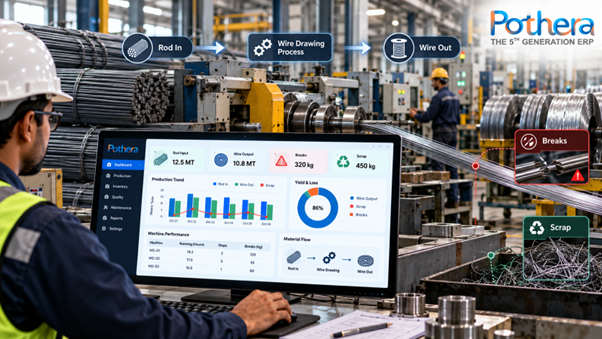

An ERP tracks wire drawing by giving every wire rod coil a lot number at receipt, issuing it to a drawing machine against a work order, recording each coil or spool of finished wire with its weight and diameter, logging every wire break with a reason code, and posting scrap and offcuts as separate stock. The system then reconciles every lot with one simple balance: rod in = wire out + scrap + process loss. When that balance is tracked per lot, per machine and per shift, yield stops being a guess and becomes a number you can act on.
What Is Wire Drawing, and Why Is It Hard to Track?
Wire drawing is a metalworking process that reduces the diameter of a wire by pulling it through a series of dies. Metals such as steel, copper and aluminium are drawn this way, and the process raises tensile strength while improving surface finish. Lubrication, die condition, drawing speed and tension all affect how often a wire breaks.
That is exactly what makes tracking difficult. A single rod coil may pass through several dies and several machines. It is converted into multiple spools of different lengths. Some of it becomes breakage, some becomes die-start and tail-end offcuts, and some is lost to lubricant, scale or rework. On a shop floor running on registers, spreadsheets and end-of-shift notes, nobody can say with confidence how much rod was consumed for how much saleable wire.
This is also why general accounting software falls short. As Crowe notes, wire and cable companies need more than a standard ERP offers, especially across stages such as drawing, annealing and stranding.
How Does ERP Track Wire Drawing, Step by Step?
1. Rod In: Receipt and Lot Creation
When wire rod arrives, the ERP creates an inventory lot for each coil or bundle. A good record holds the supplier, heat or batch number, grade, rod diameter, gross and net weight, and the test certificate reference. This is the traceability anchor: every metre of wire that comes out later can be tied back to this lot.
2. Rod Issued: Work Order and Machine Allocation
A production work order defines the target wire size, the number of drawing passes, the drawing machine and the planned output. When the operator draws rod from the store, the ERP issues that specific lot to that work order. Weight issued is recorded at the moment of issue, so consumption is never estimated after the fact.
3. Wire Out: Output Per Coil or Spool
Each finished coil or spool is weighed and labelled, usually with a barcode or QR code. The ERP records the output size, net weight, length where relevant, and the machine, operator and shift. Every output unit carries a parent link to the rod lot it came from, which is what gives you forward and backward traceability.
4. Breaks: Logged With Reason and Length
Wire breaks are normal in drawing, but unrecorded breaks are expensive. The ERP captures each break event with machine, die stage, time, operator and a reason code such as rod defect, die wear, lubrication issue, welding joint failure or power interruption. Over a month, this turns a vague complaint (“too many breaks on Machine 4”) into a ranked cause list you can fix.
5. Scrap: Categorised, Weighed and Posted
Scrap is not one bucket. Mature setups split it into at least four types:
- Start and end offcuts from die-threading and coil tails
- Break scrap from the broken ends and discarded lengths
- Quality rejects such as size deviation or surface defects found at inspection
- Reworkable material that can be re-drawn or re-processed
Each category is weighed and posted to a scrap location in the ERP, so it can be sold, remelted or reprocessed with a clean paper trail, and so its cost is booked correctly.
6. Reconciliation: The Mass Balance
At work order close, the ERP compares what went in with what came out:
Rod issued (kg) = Good wire (kg) + Scrap (kg) + Process loss (kg)
Process loss is the unexplained difference from lubricant, scale and weighing tolerance. A small, stable figure is healthy. A rising figure is an early warning of unrecorded scrap, weighing errors or leakage.
What Data Does the ERP Capture at Each Stage?
| Stage | What is recorded |
| Rod receipt | Lot, heat number, grade, diameter, weight, test certificate |
| Rod issue | Work order, machine, weight issued, date and time |
| Wire output | Coil or spool ID, size, net weight, operator, shift |
| Breaks | Time, die stage, reason code, length lost |
| Scrap | Category, weight, machine, work order |
| Close and reconcile | Rod in vs wire out vs scrap |
Which KPIs Does ERP Calculate for Wire Drawing?
- Yield % = good wire weight divided by rod issued weight, multiplied by 100
- Scrap % = total scrap weight divided by rod issued weight, multiplied by 100
- Breaks per tonne and breaks per machine per shift
- Average spool length and short-length percentage
- Process loss %, tracked by lot and by machine
- Cost per kg of wire, including rod, power, dies, lubricant and labour
Because these are calculated from transactions rather than typed into a sheet, they update in near real time. That is the practical meaning of the “real-time visibility, reduced waste and faster data-driven decisions” that ERP platforms such as Pothera ERP are built to deliver.
How Does ERP Connect Wire Drawing to Costing and Traceability?
Once rod, output and scrap are tied to the same lot and work order, costing becomes accurate by default. The ERP can allocate rod cost to good wire and scrap in proportion, add conversion cost, and give you a true cost per kg of every spool. It also lets you answer customer complaints fast: scan a spool, see its rod lot, supplier, machine and shift, and identify every other spool from the same lot in minutes rather than days.
This matters further downstream too. Drawn wire often feeds annealing, stranding, extrusion or galvanising, and a single traceability chain across these stages is what separates a controlled plant from a reactive one.
What Should You Look for in an ERP for Wire Drawing?
- Lot-level traceability from rod coil to finished spool
- Multi-stage routing for passes, annealing and finishing
- Break and downtime logging with reason codes the operator can enter in seconds
- Scrap and offcut handling as proper inventory, not write-offs
- Barcode or QR labelling with weighing scale integration
- Yield and variance reports by lot, machine, shift and operator
- Industry configurability, so the ERP matches your floor rather than forcing your floor to match the ERP
- Cloud access and integration with accounts, sales and purchase
Industry-focused vendors in the wire space, such as Crowe’s metals ERP and STAIN’s production software for wire drawing mills, show how specialised this category has become. The key test for any vendor is whether it can model your actual drawing process, not a generic one.
How Does Bsquare Approach Manufacturing ERP?
Bsquare Solutions is a New Delhi-based IT and ERP company that began in 2001 and now serves clients across industries. Its fifth-generation Pothera ERP is a cloud-based platform built around industry-specific configuration, which is the approach that process manufacturing needs.
You can see this in its published work. Bsquare configured Pothera for Jagdev Engineering Solutions in the aluminium and die casting industry, to improve efficiency and quality control. It also moved Alpine of Asia Pacific India from its earlier Intact ERP to Pothera, with integrated Sales, Purchase, Inventory and Finance modules.
For a wire drawing unit, the same principle applies: map rod receipt, issue, drawing passes, breaks, scrap and reconciliation in the ERP exactly the way your floor works, then report on it daily. To discuss a wire drawing setup, contact the Bsquare team.
Frequently Asked Questions
What is the main purpose of ERP in a wire drawing plant?
To connect rod consumption, wire output, breaks and scrap to one lot and one work order, so yield, cost and traceability are calculated from real transactions rather than estimates.
How does ERP calculate yield in wire drawing?
Yield is good wire weight divided by rod issued weight, multiplied by 100. The ERP calculates it per work order, lot, machine and shift, and it compares the result with the standard yield you set.
How are wire breaks recorded in an ERP?
Operators log each break at the machine, usually through a tablet, terminal or barcode scan, selecting a reason code. The ERP stores machine, die stage, time and length lost, then reports breaks per tonne and the top causes.
How is scrap treated in an ERP?
Scrap is weighed, categorised (offcuts, break scrap, rejects, reworkable) and posted to a scrap location. This keeps stock accurate, lets you sell or reprocess it, and allocates its cost correctly.
Can ERP trace a finished wire spool back to its rod lot?
Yes. Each spool or coil is linked to the rod lot and work order it came from, so a single scan shows supplier, heat number, machine, shift and operator.
What is process loss, and how much is acceptable?
Process loss is the unexplained gap between rod issued and wire plus scrap recorded, caused by lubricant, scale and weighing tolerance. The acceptable level depends on your metal, wire size and process, so set it from your own historical data, then watch for upward drift.
Is a cloud ERP suitable for wire drawing mills?
Yes, as long as it supports weighing and labelling at the floor and works reliably with your plant’s connectivity. Cloud access also gives owners and managers live yield and scrap numbers from anywhere.
Key Takeaways
- Track rod by lot from the moment it enters the gate.
- Issue rod to work orders by weight, never by estimate.
- Log every break with a reason code and length.
- Treat scrap as categorised inventory, not a write-off.
- Close every work order with the mass balance: rod in = wire out + scrap + process loss.
- Review yield, breaks per tonne and cost per kg every week.
Ready to see your drawing floor in numbers? Talk to Bsquare Solutions about configuring Pothera ERP for your wire drawing process.



Join the conversation