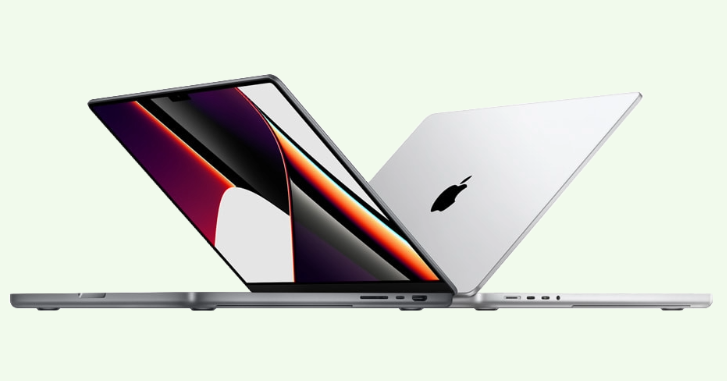
Creative projects rarely place equal demands on every computer. Editing high-resolution footage, building motion graphics, processing large image libraries and producing complex visual assets can require considerably more computing power than everyday office work. A Mac Rental Company can give production teams access to Apple hardware suited to a specific assignment without making permanent equipment ownership the starting point for every new creative brief.
This is particularly useful when the technology requirement changes from one production to another. A photography project may prioritise display quality and portability, while a post-production assignment could demand greater memory, storage capacity and sustained processing performance. Renting allows agencies, studios and independent production teams to build their hardware setup around the work rather than forcing every project onto the same machines.
Creative workloads are rarely predictable
Production environments can change quickly. An agency may spend several weeks working on relatively lightweight digital campaigns before receiving a brief involving 4K footage, complex animation or hundreds of high-resolution source files. Existing office computers may perform perfectly well for routine work but struggle when those heavier assignments arrive.
Buying additional machines every time workload intensity increases can create an expensive hardware cycle. Once the demanding project ends, those computers may no longer be needed at full capacity. Equipment rental offers another way to address temporary performance requirements without assuming the same level of demand will continue indefinitely.
This is also relevant for companies that regularly assemble different creative teams. A campaign could involve editors, designers, colourists, photographers and motion specialists working together for a limited period. Each role can have distinct computing requirements, making a one-specification-for-everyone approach inefficient.
Start with the software rather than the Mac model
Choosing creative hardware should begin with the applications being used. Video editing software, animation tools, image-processing applications and audio platforms place different demands on processors, graphics capabilities, memory and storage. Starting with a familiar device name without considering the workload can result in either insufficient performance or unnecessary specification.
A designer primarily creating web graphics may not need the same setup as an editor handling multi-camera footage. Similarly, someone reviewing content and managing project files could work effectively on a different configuration from the person rendering final visual effects. Matching hardware to actual software use helps keep the equipment selection practical.
Before arranging Apple Mac rental, production managers can gather information about the workflow from the people who will use the machines. Software versions, typical file sizes, expected output resolution and simultaneous applications are all useful details. This creates a technical requirement based on real work rather than assumptions.
MacBook Pro rental can support production beyond the studio
Creative work no longer happens exclusively at permanent desks. Photographers review images on location, film crews manage media near a set and agency teams may work from client offices during important campaigns. Portable performance becomes valuable when the production environment changes throughout the project.
MacBook rental can provide a workstation that travels between these locations more easily than a desktop setup. Editors can work from temporary production spaces, designers can present work directly to clients and photographers can begin reviewing captured material without returning to their main studio. Portability can therefore influence productivity as much as raw computing specifications.
Battery life, screen size and connectivity should be considered alongside processing requirements. A professional who frequently travels may value a different configuration from someone whose laptop remains connected to an external monitor all day. Understanding the physical workflow helps narrow the equipment choice.
Desktop Macs can create focused editing stations
Portability is not always the priority. Some creative assignments benefit from dedicated workstations where team members remain in one production environment throughout the project. An iMac rental setup can suit situations where an integrated desktop display and fixed working position make more sense.
A permanent-style editing station can also reduce the need for employees to repeatedly connect and disconnect multiple components. In a temporary studio, several similar workstations can be arranged for editors, designers or production staff. This creates a structured environment even when the studio itself exists only for the duration of a campaign.
Desktop equipment can be particularly useful for workshops and collaborative production spaces. Team members know exactly where specific tasks will be performed, while project managers can organise software and peripherals around each station. The objective is not simply to rent computers but to create a workspace that supports the production process.
Large media files change the storage conversation
Creative teams often focus heavily on processor and memory specifications while overlooking storage. High-resolution photography, raw video, animation assets and audio libraries can consume large amounts of space quickly. A machine that performs well may still become frustrating if local storage is constantly running out.
Project managers should estimate how much working space each user requires before selecting hardware. Consider source material, temporary files, application caches, project versions and final exports rather than looking only at the finished deliverable. Creative applications can generate substantial working data that disappears from view once a project is completed.
External storage may also form part of the workflow. Teams should check connection requirements before the equipment arrives, particularly when existing drives use specific interfaces. Adapters and hubs may appear minor, but missing connectivity can stop an otherwise powerful workstation from accessing essential project files.
Memory requirements depend on how creatives actually work
Creative professionals frequently keep several demanding applications open simultaneously. A designer might move between image editing, layout software, a browser and communication tools, while an editor could use video software alongside audio, graphics and media-management applications. Memory requirements therefore need to reflect multitasking rather than one application viewed in isolation.
Larger or more complex projects can increase this demand further. High-resolution timelines, layered compositions and large image documents may all consume substantial system resources. Choosing enough memory can help maintain a smoother working environment when employees move between tasks.
This is another reason computer rental can suit specialised production. Instead of purchasing high-specification machines for occasional workloads, a team can source more capable hardware when a particular assignment calls for it. Routine work can continue on existing systems once the intensive production period ends.
Build the workstation around the person using it
The Mac is only one part of a professional creative environment. Displays, input devices, headphones, card readers, external drives and other accessories can influence how efficiently a person works. A production setup should therefore be considered as a complete workstation rather than an isolated computer.
Depending on the assignment, useful additions may include:
- External monitors for larger editing workspaces
- Keyboards and mice for fixed desks
- USB-C hubs for additional connections
- Card readers for photography workflows
- External drives for project media
- Headphones for audio review
- Presentation displays for client sessions
- Appropriate adapters for existing equipment
Not every user needs every accessory. A photographer importing memory cards has different requirements from a motion designer working with network-based project files. Creating workstation profiles for different roles can prevent unnecessary equipment from being ordered.
Temporary production studios need consistent technology
Film shoots, advertising campaigns and event productions sometimes require a temporary studio to operate for only a few days or weeks. These environments still need dependable technology even though the infrastructure is short-lived. Teams may need editing stations, production management computers and machines for reviewing content as it is created.
Computer rental can make it easier to assemble this environment without dismantling the organisation’s main studio. Existing employees can continue using their usual equipment while a separate hardware pool supports the temporary production. This separation can reduce disruption to other client work.
Consistency is especially useful when multiple creatives perform similar tasks. Giving several editors comparable machines can reduce performance differences between workstations and simplify troubleshooting. The team can focus on the project instead of adapting workflows around mismatched computers.
On-site editing can shorten the feedback cycle
Waiting until everyone returns to the studio before reviewing content can slow production. On-site editing allows teams to check footage, photographs or other assets while the people responsible for creating them are still present. Problems can potentially be identified while there is still an opportunity to correct them.
For example, a photographer can review images with a creative director before dismantling the set. A video team can inspect important footage before moving to another location. These workflows require computers capable of handling the media efficiently in a temporary environment.
A suitable laptop rental arrangement can make these mobile review stations easier to deploy. The equipment can follow the production rather than requiring the production to remain close to a permanent editing suite. For time-sensitive projects, this can make the feedback process more immediate.
Client review sessions need a different setup from production
The computer used to create an asset is not necessarily the only technology required to present it. Agencies often invite clients to review campaigns, videos, designs or interactive work before final delivery. These sessions can involve additional screens, presentation equipment and machines dedicated to displaying approved versions.
Separating presentation hardware from active production machines can help keep sessions organised. Editors can continue working while another device handles client playback or presentations. It also reduces the need to rearrange an employee’s entire workstation whenever stakeholders visit.
The environment should be tested before the client arrives. Files, connections, audio and display output should all work as expected. Technical preparation helps keep attention on the creative work rather than the equipment being used to show it.
Freelance specialists may need to enter an established workflow
Creative businesses frequently bring external specialists into projects. A freelance animator or editor may join for a specific phase, then leave once their part of the production is complete. Providing appropriate hardware can help that person integrate into the existing workflow without relying on whatever personal computer they happen to own.
This can also improve consistency across a collaborative project. When files move between team members, compatible software versions and adequate hardware specifications reduce avoidable technical issues. The organisation retains greater control over the working environment.
A rented workstation can be prepared specifically for the assignment and returned afterwards. This differs from purchasing a machine that could remain unused after the specialist leaves. The hardware requirement follows the production schedule rather than becoming a permanent asset.
Think about data management before production begins
Creative files can contain unreleased campaigns, confidential client assets and commercially sensitive material. Hardware planning should therefore include data management from the start. Performance alone should not determine how a temporary workstation is configured.
Teams should establish where project files will be stored and how users will access them. Depending on company policy, work may remain on approved external storage, secure cloud platforms or managed internal systems. Employees and contractors should understand the permitted locations before production starts.
The return process also deserves attention. Business data should be handled according to the organisation’s security procedures before rented hardware leaves its control. Access credentials, locally stored files and project accounts should all be reviewed as part of project closeout.
Avoid changing the workflow halfway through production
A hardware problem discovered after production starts can be expensive in terms of lost time. Creative teams often work against fixed deadlines, leaving little room to migrate files or reconfigure systems halfway through a campaign. Testing the intended setup beforehand can identify incompatibilities early.
Where possible, test the core applications, project files and peripherals on the selected hardware before full deployment. Confirm that storage devices connect correctly and that required software performs as expected. Even a short technical test can reveal missing adapters or specification issues.
This is particularly valuable when many workstations will use the same configuration. Solving one problem before ten machines are deployed is much easier than troubleshooting the same issue repeatedly. Preparation becomes more important as the production environment grows.
Scaling a production without scaling permanent infrastructure
A studio may normally employ a small permanent creative team but occasionally handle projects requiring much greater capacity. Expanding permanent infrastructure for the busiest few weeks of the year can leave substantial equipment idle during quieter periods. Flexible technology sourcing provides another option.
Working with a Mac Rental Company allows the production environment to expand around a particular assignment. Additional editing stations or portable Macs can be brought in when the workload requires them and removed after delivery. This can help agencies accept larger projects without immediately redesigning their permanent hardware estate.
The same principle can apply to one-off productions. A company organising a large content shoot may need powerful machines for only a short post-production window. Matching equipment duration to production duration keeps the technology decision connected to the work generating the requirement.
Creative hardware should be planned by production stage
A single project can have several phases, and the hardware requirement may change between them. Pre-production may involve scheduling, storyboarding and asset management, while production can require media review and file handling. Post-production may then demand the most intensive editing and rendering capabilities.
Breaking the project into stages helps avoid renting every piece of equipment for the entire duration. Some machines may only be needed during editing, while portable systems could be more valuable during the shoot itself. The schedule can therefore influence both the hardware type and rental period.
Production managers can map technology requirements alongside the project timeline. This creates a clearer picture of when equipment should arrive and when it can leave. It can also help prevent expensive hardware from sitting unused while the project is in another phase.
Questions to resolve before booking creative Macs
A good equipment brief should describe the work rather than simply request a number of computers. The rental provider needs enough information to match hardware to the technical and logistical requirements of the production. Preparing these details can also expose gaps in the internal workflow before equipment is ordered.
Consider establishing:
- Which creative applications will be used
- Expected video or image resolutions
- Approximate project file sizes
- Memory requirements for demanding applications
- Local and external storage requirements
- Number of portable and fixed workstations
- External display requirements
- Ports, hubs and adapters needed
- Delivery and collection dates
- Locations where equipment will be used
- Requirements for additional machines if the project expands
These points provide a more useful foundation than choosing equipment based on brand familiarity alone. They also make it easier to separate essential performance requirements from specifications that may not affect the actual work. A well-defined technical brief can therefore improve both workflow and equipment selection.
Give creative teams technology that follows the brief
Creative production works best when technology supports the idea rather than becoming another obstacle to completing it. A Mac Rental Company can help agencies, studios and production teams assemble Apple hardware around demanding assignments, changing locations and specialist contributors without treating every temporary requirement as a permanent purchase. The strongest setup will still depend on careful matching between software, media formats, performance and the people doing the work.
MacBook rental, iMac rental and broader computer rental options can each serve different parts of a production workflow. Portable systems can support location work and mobile review, while fixed workstations can create dedicated spaces for editing, design and post-production. Accessories, storage and connectivity should be planned at the same time so each workstation arrives ready for its intended role.
Ultimately, creative technology planning should begin with the production brief. Understanding who will use each machine, what they will create and where that work will happen makes hardware selection far more purposeful. When those requirements change from project to project, flexible Mac hire can give production teams room to adapt without allowing temporary technical demands to dictate their permanent IT infrastructure.